
Direct Answer
A Shopify invoice generator is any tool (native, free, or third-party) that creates branded, tax-compliant PDF invoices from your store’s orders. You can generate invoices on Shopify in four main ways:
- Shopify’s free online invoice generator: a one-off web tool, not connected to your store
- Native draft orders: for manual invoicing inside Shopify admin
- The free Order Printer app: basic, but needs HTML/CSS/Liquid for customization
- Third-party invoice apps: automated, brand-styled, and compliant with VAT, GST, or PEPPOL rules
The right choice depends on your order volume, where you sell, and whether you serve B2B customers.
Why “Just Send the Order Confirmation” Is Not Enough Anymore
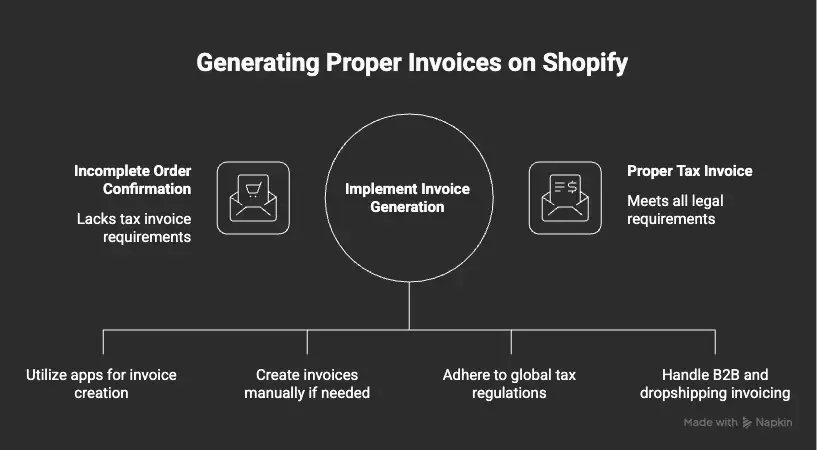
Suppose you run a Shopify store, and a B2B customer in Berlin emails you saying, “Please send a proper Rechnung.” You forward them the Shopify order confirmation email. They reply, “This is not a tax invoice.”
Now you have a problem. The customer needs a structured document with a sequential invoice number, your VAT ID, their VAT ID, supply date, and an itemized tax breakdown. The order confirmation has none of this.
This guide solves that problem. We will walk through every method to generate invoices on Shopify, the global tax rules most blogs skip, and how dropshippers and B2B sellers should handle invoicing differently from regular D2C stores.
Why Shopify’s Default Invoicing Falls Short
Shopify gives you a few invoice-like features out of the box, but each has limits. Let’s break them down.
The order confirmation email acts as a basic receipt. It works for casual D2C buyers, but it is not a legally valid tax invoice in most countries. According to the Shopify Help Center on draft orders, a draft order is built for collecting payment, not for issuing a finished tax document.
The free Shopify invoice generator at shopify.com/tools/invoice-generator is a standalone web form. You fill in details, and it emails you a PDF. It is not connected to your store, so you cannot pull order data, automate sending, or maintain a numbering sequence.
The free Order Printer app by Shopify can generate invoices and packing slips, but as the Shopify Order Printer documentation notes, customizing the templates needs HTML, CSS, and Liquid. Most store owners do not have time to learn three languages just to add a VAT field.
This means: if you sell to multiple countries, handle B2B orders, or process more than a handful of orders a day, you will outgrow the defaults quickly.
Why Compliant Invoicing Is Harder in 2026
The reason invoicing is more complex now than five years ago comes down to three shifts:
- System limitations: Shopify’s checkout was not built around tax-document generation. It captures payment data, not invoice metadata like supply date, sequential numbers, or buyer tax IDs.
- Scaling pressure: Manual invoicing breaks at around 50 orders a day. Errors creep in, numbering gets skipped, and accountants flag it during audits.
- Regulatory changes: Governments are moving toward structured e-invoicing. Germany already requires all businesses to be able to receive structured e-invoices since January 2025, and Belgium will mandate B2B PEPPOL invoicing from January 1, 2026.
So a method that worked for a small store in 2022 may not pass a tax audit in 2026.
The 4 Ways to Generate Invoices on Shopify
Let’s walk through each method, when to use it, and where it falls short.
Method 1: Shopify’s Free Online Invoice Generator
This is the tool at shopify.com/tools/invoice-generator. You enter business details, client details, and line items, then receive a PDF by email.
Use it when: You need a one-off invoice for a custom service or off-platform sale. Freelancers and Shopify Partners often use it.
Skip it when: You want to generate invoices from real Shopify orders. It does not pull order data, and there is no automation.
One thing worth knowing: Shopify emails you a PDF confirmation whenever you use this tool, which sometimes catches store owners off guard. If you received one and weren’t sure whether it was real or a phishing attempt, here’s how to tell the difference in under 30 seconds →
Method 2: Native Draft Orders
Inside your Shopify admin, go to Orders > Drafts > Create order. Add the customer, line items, taxes, and shipping. Then click Send invoice, and Shopify emails the customer a checkout link.
The Shopify Help Center confirms that the invoice contains a checkout link, where the customer can enter billing info and pay.
Use it when: You manually quote B2B orders or accept custom requests over email or social media.
Skip it when: You need a polished, branded PDF invoice. The draft order email is plain text with a checkout link, not a downloadable tax document.
Method 3: The Free Order Printer App
The free Shopify Order Printer app lets you print or export invoices, packing slips, and pick lists in bulk. Templates are built with HTML, CSS, and Liquid.
Use it when: You have basic invoicing needs and either know how to code or have a developer. It is genuinely free with no usage limits.
Skip it when: You want a no-code editor, automated email delivery, or VAT and B2B fields out of the box.
Method 4: Third-Party Shopify Invoice Apps
This is what most growing stores end up using. Apps like Order Printer Pro, Vify, Sufio, and Softify give you no-code template editors, automatic email delivery, multi-currency, multi-language, B2B fields, and tax compliance helpers.
Use it when: You process more than 30 orders a day, sell internationally, run a B2B segment, or need legally valid invoices for tax authorities.
Quick Decision Matrix
To make this clearer, here is a simple way to choose:
| Your situation | Best method |
|---|---|
| Off-platform freelance work | Shopify’s free online generator |
| 5-20 orders a month, mostly B2C | Native draft orders + order confirmation |
| You have dev help and want zero cost | Free Order Printer app |
| 30+ orders a day, multi-country, B2B mix | Third-party invoice app |
| EU seller worried about PEPPOL compliance | Third-party app with PEPPOL or ZUGFeRD support |
Step-by-Step: Setting Up Automated Invoicing on Shopify
Once you know which method fits, follow this workflow to set it up properly. This is the order most stores should follow.
Step 1: Audit your invoice requirements
List the countries you sell to, the tax IDs you need to display (VAT, GST, ABN, TRN, EIN), the languages your customers expect, and whether you have B2B customers. This list shapes everything else.
Step 2: Pick your method using the matrix above
If you fall into the “third-party app” bucket, shortlist 2-3 apps based on your specific needs. The next section compares popular options.
Step 3: Configure invoice fields
At minimum, your invoice should include: a sequential invoice number, your business name and tax ID, the customer’s name and tax ID for B2B, supply date (the date goods were delivered), itemized tax breakdown, and total in the customer’s currency. The Fordeer team has a detailed compliance breakdown that explains why each field matters.
Step 4: Set up automatic delivery
If you use Shopify Flow, the Send Order Invoice action can email B2B invoices to multiple recipients automatically using Metafields. Most third-party apps also offer trigger-based emails (on order paid, on order fulfilled, etc.).
Step 5: Test with a draft order
Create a fake order, run it through the workflow, and check the resulting invoice in the customer’s inbox. Verify currency, language, tax fields, and the PDF download link.
Step 6: Set up bulk export for accounting
Most stores need to send invoice exports to their accountant monthly. Apps like Sufio and Order Printer Pro let you bulk filter and export invoices as PDF or CSV. Some, like Invoice Browse, can auto-backup to Google Drive or FTP.
If the printing and delivery side of the workflow is what you’re focused on — bulk printing from the Shopify admin, letting customers download their own copies, or sending PDFs in bulk — here’s a dedicated walkthrough of that entire process →
Global Compliance Essentials Most Guides Skip
Here is where most Shopify invoicing blogs stop short. If you sell internationally, the rules below directly affect what your invoice must include.
European Union: The PEPPOL Shift
The EU is moving toward mandatory structured e-invoicing under the VAT in the Digital Age (ViDA) initiative. According to the European Commission’s eInvoicing Country Factsheets, every member state has its own rollout schedule, but the broad direction is the same: structured XML invoices over the PEPPOL network using the EN 16931 standard.
Key dates from the Fonoa EU e-invoicing guide and Fiskaly’s 2026 roadmap:
- Germany: Mandatory ability to receive structured e-invoices since January 2025. Sending becomes mandatory by 2027-2028 based on revenue.
- Belgium: Mandatory B2B e-invoicing via PEPPOL from January 1, 2026.
- France: Phased rollout starting September 2026.
- Italy: Already running mandatory e-invoicing through the SDI platform with FatturaPA format.
- Poland: Mandatory from February 1, 2026.
- EU-wide ViDA: All intra-EU B2B and B2G invoices must be structured e-invoices by July 2030.
If you sell to EU buyers, look for Shopify invoice apps that support PEPPOL, ZUGFeRD, or Factur-X formats. As one example, AG Order Printer can embed e-invoice XML in PEPPOL, ZUGFeRD, or Factur-X format.
United Kingdom
The UK requires VAT invoices for B2B sales above certain thresholds. Required fields include a unique sequential number, your VAT registration number, supply date, and a per-rate tax breakdown.
India: GST Invoicing
If you sell in India, your invoice needs your GSTIN, the customer’s GSTIN for B2B, HSN code per product, and a per-tax-component breakdown (CGST, SGST, IGST). Several Shopify apps offer GST-ready templates built specifically for Indian compliance.
United States
The US has no federal invoice mandate, but you may need to handle sales tax nexus across states. According to the Shopify Tax pricing page, Shopify Tax is free for US stores up to $100,000 USD in global sales per calendar year, then charges per-order fees.
Cross-Border Sellers and Dropshippers
If you ship internationally, your commercial invoice must include HS codes (Harmonized System codes) and country of origin. The Shopify Help Center on duties explains why: customs uses these to calculate import duties, and the wrong code can mean a 0% or a 15% duty rate.
A major shift to know about: as of August 29, 2025, US de minimis no longer applies. Duties and import taxes apply to all US imports regardless of shipment value. For dropshippers selling into the US, this changes your landed cost calculation entirely.
The commercial invoice requirements for cross-border shipping go much deeper than most guides cover — customs delays, HTS codes, IOSS numbers, and machine-readable formatting are all part of it. Here’s a full breakdown of what your Shopify commercial invoice needs to include to clear customs without issues →
Self-Billing for Dropshipping
This one is rarely discussed. According to Shopify’s own retail invoice guide, self-billing invoices are useful for dropshipping because the buyer (often a retailer or marketplace) creates the invoice on the seller’s behalf. This works for high-volume supplier arrangements where manual invoicing would slow everything down.
Comparing Popular Shopify Invoice Apps
Here is a side-by-side look at the most established invoice apps on the Shopify App Store, based on current listings as of 2026. This list is tool-agnostic. The right pick depends on your situation.
| App | Best for | Free plan | B2B support | E-invoicing (PEPPOL/UBL) | Standout strength |
|---|---|---|---|---|---|
| Order Printer Pro | All sizes, scaling stores | Free to install | Yes | Limited | Most reviewed (2,400+), 24/7 support, deep customization |
| Vify Order Printer | Small to mid B2C and B2B | Yes | Yes | Limited | Free plan with strong customization |
| Sufio | EU and UK stores needing accountant-validated docs | Paid only | Yes | Yes | Templates validated by certified accountants in 100+ countries |
| Softify Easy Invoice+ | Multi-language, multi-currency, B2B | Free trial | Yes | Yes | Drag-and-drop visual designer |
| AG Order Printer | EU sellers with PEPPOL needs | Yes | Strong | PEPPOL, ZUGFeRD, Factur-X | Built-in EU e-invoicing XML |
| Mega PDF Invoices | Stores wanting custom workflows | Yes | Yes | Limited | Custom conditional fields and 20-language support |
| Invoice Hero PDF | Small stores wanting payment reminders | Yes (50 invoices) | Yes | Limited | Built-in AR tools and overdue reminders |
| Shoptopus Invoice Generator | Free, simple PDF generation | Fully free | Basic | No | Simplest option for budget stores |
A note on choosing: do not pick the app with the most features. Pick the one that handles your specific compliance requirements. An EU seller is better off with Sufio or AG Order Printer than with a feature-heavy app that lacks PEPPOL support.
Actionable Tips for Scaling Your Shopify Invoicing
Here are the practical habits that separate stores that scale smoothly from those that hit walls during audit season.
Set up sequential numbering from day one. Tax authorities in the EU, UK, and India expect a gapless, sequential numbering system. Switching mid-year creates a visible gap in your records and triggers audit questions. Pick your format (e.g., INV-2026-0001) before your first sale.
Collect tax IDs at checkout, not after. Adding a VAT or GST field to checkout means you have the data before the order is processed. Asking for it later means delayed shipping, more support tickets, and angry B2B customers. Apps like F: PDF Invoice Generator allow VAT, GST, TRN, ABN, or TIN fields on B2B invoices.
Localize your templates per market. If you sell in Germany but your invoice is only in English, you may technically be in violation of local rules. Use templates that translate “Invoice” to “Rechnung” or “Facture” automatically based on the buyer’s market.
Automate credit notes for refunds. Every refund needs a matching credit note that references the original invoice number. Most third-party apps do this automatically once a refund is processed in Shopify.
Backup your invoices off-Shopify. Store copies in Google Drive, Dropbox, or your accounting software. If you ever migrate platforms or face an audit, having an external archive saves you days of manual work.
Use Shopify Flow for B2B multi-recipient delivery. The OrderInvoiceSend action supports sending B2B invoices to multiple email addresses by storing them in company location Metafields, useful when accounting and procurement are separate departments.
Add HS codes and country of origin to every product. This is critical for cross-border sellers, especially with the new US de minimis rules. Shopify lets you bulk-upload these via CSV.
Common Invoicing Errors and How to Fix Them
These show up constantly in the Shopify community forum. Knowing them ahead of time saves hours.
“Draft order couldn’t be created.” This usually means the customer record is missing a required field, often the email or shipping address. Open the customer profile, fill in the gaps, then retry the draft order.
Cannot send an invoice for an order already marked as paid. If you mark a draft as paid before the customer pays, the checkout link breaks. Workaround: use a third-party app that lets you generate an invoice PDF after the fact, or manually email a custom receipt.
Currency mismatch in multi-market stores. As Shopify’s draft orders documentation explains, the invoice currency is determined by the market tied to the customer’s shipping address. If the currency looks wrong, check which market the customer is assigned to.
Missing VAT or GST fields on the PDF. This means your invoice template does not pull the customer’s tax ID metafield. Either edit the template (Order Printer) or switch to an app that supports B2B tax fields by default.
Numbering gaps after refunds. Refunds should not break your invoice sequence. They generate credit notes, which use a separate sequence (e.g., CN-2026-0001). If your numbers have gaps, your app is likely misconfigured, fix this before your next tax filing.
FAQ
1. Does Shopify have a built-in invoice generator?
Yes, two of them. There is a free standalone tool at shopify.com/tools/invoice-generator for one-off invoices, and there is the free Order Printer app for printing invoices from real orders. Neither is automated, and Order Printer needs HTML/CSS/Liquid for customization.
2. Is the Shopify order confirmation email a valid tax invoice?
In most countries, no. The order confirmation lacks required fields like a sequential invoice number, your tax ID, the buyer’s tax ID for B2B, and a structured tax breakdown. For B2B and EU customers especially, you need a proper invoice generated by an app or Shopify Flow.
3. What is the best free Shopify invoice generator?
For pure cost, the free Order Printer app by Shopify is the most flexible if you can handle code. For a no-code option, apps like Vify, Mega PDF Invoices, and Shoptopus offer free plans suitable for smaller stores. The right pick depends on volume and whether you need automated email delivery.
4. How do I generate invoices for B2B or wholesale customers on Shopify?
Use draft orders for manual quoting, or set up Shopify Flow with the Send Order Invoice action for automation. For volume B2B, a dedicated app like Sufio, Softify, or AG Order Printer handles net payment terms, PO numbers, multi-recipient email, and VAT validation in one workflow.
5. Do I need PEPPOL or e-invoicing for my Shopify store?
Only if you sell into countries with active e-invoicing mandates. As of 2026, Germany requires the ability to receive structured e-invoices, Belgium has mandated B2B PEPPOL invoicing from January 1, 2026, and the broader EU ViDA mandate hits all intra-EU B2B by July 2030. If you sell B2B in the EU, switch to a Shopify invoice app that supports PEPPOL, ZUGFeRD, or Factur-X formats.